MyDoctor app - Medical app for low income patients
My role in the project
UX designer designing an app for MyDoctor from conception to delivery.
Responsibilities: Conducting interviews, paper and digital wireframing, low and high-fidelity prototyping, conducting usability studies, accounting for accessibility, and iterating on designs.
Project goal
MyDoctor is an application focused on people with low income to get a medical aid.
Target audience
The typical user is between 28 – 65 years old, single parent with low income, pensioners and unemployed people.
Key challenges or constraints
People with low income lack the necessary budget to get a medical aid. Design an app for MyDoctor that allows underprivileged users to get affordable, fast and easy medical aid.
Research study details
I prepared user interviews questions based on date MyDoctor already had, which were then used to conduct user interviews. A primary user group identified through research was people with low income. They were consulting doctors only in extreme cases because they couldn’t afford it.
Initial design concepts
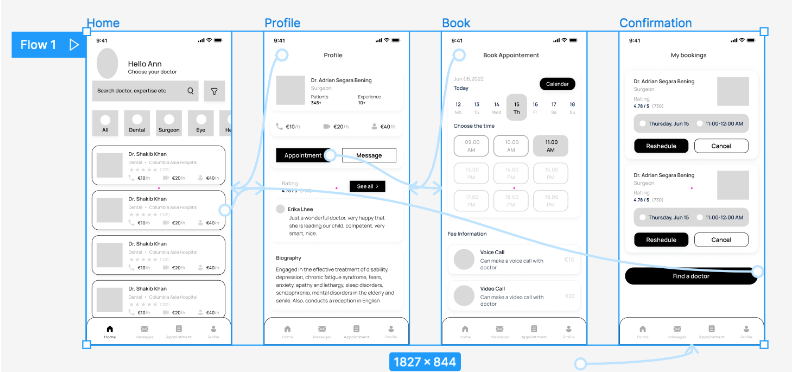
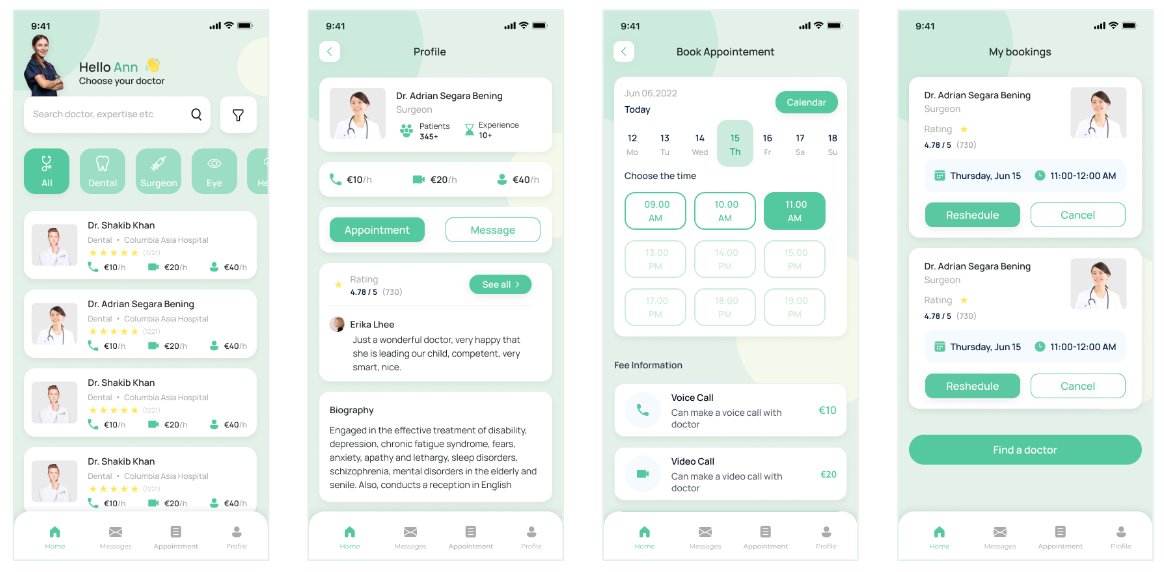
After the ideation and wireframing phase, I made sure to base screen designs on the feedback and findings from the user research. The design focused on finding a doctor according to the patient’s budget.
Wireframes / Low fidelity prototype
User testing results
Findings from the usability study helped reveal what aspects of the mockups needed refining.
Price: People prefer to have pricing options clearly displayed.
Messaging: People want to contact doctors for quick questions.
Reviews: People want to read other patients experiences with a given doctor.
Conclusion noting what was learned through the design process and possible next steps
I’ve learned that what I think is the best solution is not necessary what the end user think therefore the iteration and testing is crucial to design an app users like to use.
Next steps:
Conduct more usability study to make sure the paint points were resolve.
Make new research to discover new area to improve.
Gather and analyse the analytics data to identify how the app is used.
New Client Special Offer
20% Off
Aenean leo ligulaconsequat vitae, eleifend acer neque sed ipsum. Nam quam nunc, blandit vel, tempus.